

Microsoft 365 has become the backbone of modern business, powering email, document collaboration, Teams meetings, SharePoint sites, and OneDrive storage. Because everything lives in the cloud, many businesses assume Microsoft automatically backs up all of their data forever. That’s one of the biggest misconceptions surrounding Microsoft 365 backup.
While Microsoft provides robust infrastructure and built-in resilience, businesses are still responsible for protecting their own data against accidental deletion, ransomware, malicious insiders, and retention policy limitations through the Shared Responsibility Model. That’s where Microsoft 365 Backup comes in.
Does Microsoft 365 Automatically Back Up Your Data?
This is one of the most common questions businesses ask.
Microsoft ensures the availability of its cloud platform, but that doesn’t mean it provides comprehensive long-term backups for every business scenario.
For example, Microsoft is responsible for:
- Keeping Microsoft 365 services running
- Maintaining infrastructure availability
- Protecting the platform itself
However, organizations remain responsible for:
- Recovering accidentally deleted files
- Restoring overwritten documents
- Recovering deleted mailboxes
- Recovering data after ransomware
- Meeting regulatory retention requirements
This shared responsibility is documented by Microsoft and is one reason Microsoft introduced its backup.
Read more: The Risk is Real: Seven Reasons to Backup Microsoft 365
What Is Microsoft 365 Backup?
Microsoft 365 Backup is Microsoft’s native backup solution designed specifically for Microsoft 365 workloads.
It provides fast backup and recovery for:
- Exchange Online
- SharePoint Online
- OneDrive
- Microsoft Teams (stored SharePoint/OneDrive content)
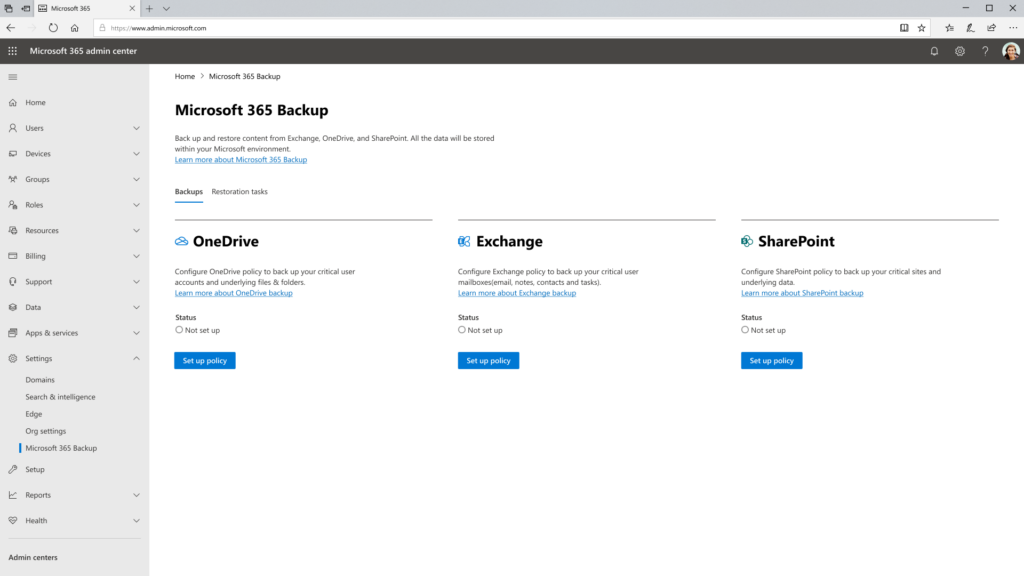
Unlike standard recycle bins or retention policies, Microsoft 365 Backup creates point-in-time backups that allow organizations to restore data quickly after accidental deletion, cyberattacks, or operational mistakes.
One of its biggest advantages is backup speed. Microsoft states the service can restore large amounts of data significantly faster by leveraging Microsoft’s own cloud infrastructure.
Why Businesses Need Microsoft 365 Backup
Microsoft 365 is one of the world’s most widely used business productivity platforms, with more than 450 million paid commercial seats according to Microsoft. Its widespread adoption also makes it an attractive target for cybercriminals, increasing the importance of having a reliable backup and recovery strategy in place.
Accidental Deletion Happens Every Day
Employees accidentally delete files, folders, emails, and Teams conversations more often than most organizations realize.
Once retention windows expire, recovery may no longer be possible without a dedicated backup solution.
Ransomware Doesn’t Just Target Devices
Modern ransomware increasingly targets cloud identities and synchronized files.
If encrypted files synchronize across OneDrive or SharePoint, organizations need clean recovery points to restore operations quickly.
Insider Threats and Human Error
Not every data loss event comes from hackers.
Former employees, malicious insiders, or simple administrative mistakes can permanently remove critical business information.
Backup provides an additional layer of protection beyond user permissions.
Compliance and Long-Term Retention
Many businesses must retain records for years to satisfy legal, financial, or industry regulations.
Microsoft 365 Backup helps organizations recover historical data while supporting broader compliance strategies.
What Microsoft 365 Backup Protects
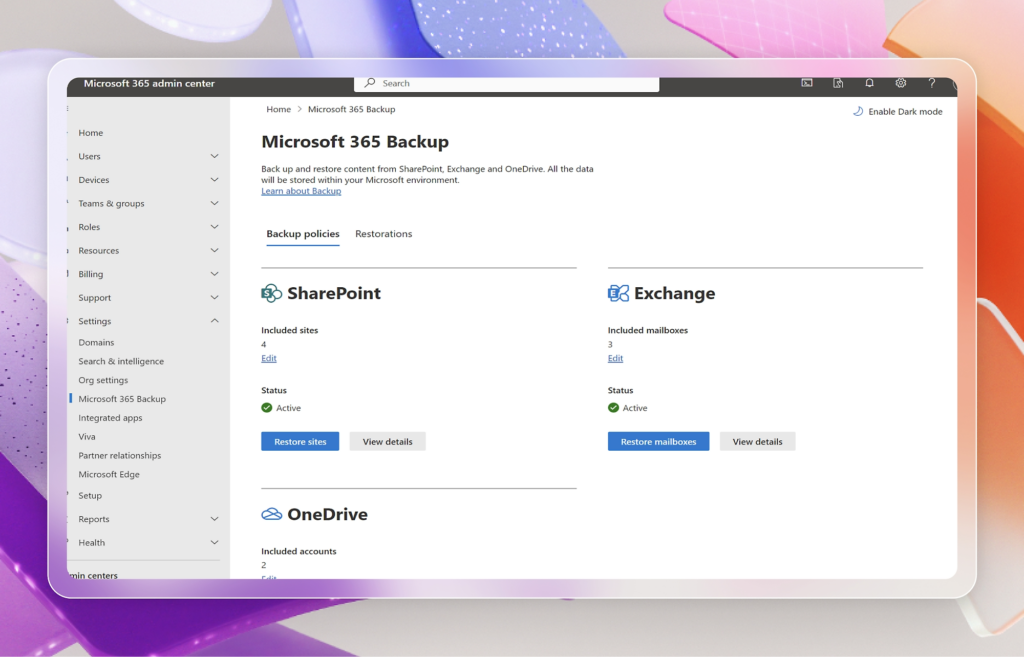
Microsoft 365 Backup is designed to protect the data your business relies on every day across the Microsoft 365 ecosystem. Here’s what it covers:
Exchange Online
Recover deleted or modified emails, mailboxes, calendars, contacts, and other mailbox data to quickly restore communication after accidental deletion or cyber incidents.
OneDrive
Restore individual files or entire folders stored in OneDrive, helping employees recover important documents without disrupting productivity.
SharePoint Online
Protect SharePoint sites, document libraries, and folders so your team can quickly recover shared business files and collaboration spaces if data is lost or corrupted.
Microsoft Teams
Microsoft Teams stores files in SharePoint and OneDrive. Microsoft 365 Backup enables you to restore these shared files, helping teams regain access to important project documents and collaboration content.
Microsoft 365 Backup vs. Traditional Backup Solutions
Microsoft 365 Backup and third-party backup solutions serve different purposes. Choosing the right option depends on your organization’s data protection needs.
| Microsoft 365 Backup | Traditional Third-Party Backup |
| Native integration with Microsoft 365 | Supports multiple platforms and workloads |
| Fast recovery using Microsoft’s infrastructure | Often provides more granular recovery options |
| Designed specifically for Microsoft 365 data | Can protect servers, virtual machines, endpoints, NAS devices, and cloud applications |
| Ideal for organizations primarily using Microsoft 365 | Better suited for businesses needing comprehensive backup across their entire IT environment |
For many organizations, it’s not a matter of choosing one over the other. Microsoft 365 Backup offers fast, native protection for Microsoft 365 workloads, while third-party backup solutions provide broader coverage across on-premises systems, endpoints, and other cloud platforms. Using both together can create a more comprehensive backup and disaster recovery strategy, especially for businesses with diverse IT environments.
Read more: Cloud Backup vs Onsite Backup: Which Is Best for Your Small Business?
Best Practices for Protecting Microsoft 365 Data
Instead of relying on backup alone, businesses should adopt multiple layers of protection:
- Enable Multi-Factor Authentication
- Use strong access controls
- Implement Microsoft 365 Backup
- Train employees against phishing
- Monitor unusual account activity
- Test recovery procedures regularly
- Review retention policies
How Sun IT Solutions Helps Protect Microsoft 365 Environments
Microsoft 365 Backup is only one piece of a broader data protection strategy.
At Sun IT Solutions, we help businesses deploy, configure, and manage Microsoft 365 environments with security and business continuity in mind. Our services include Microsoft 365 administration, backup and disaster recovery, cybersecurity, identity protection, and managed IT support to ensure your business data remains secure and recoverable.
Whether you’re adopting Microsoft 365 for the first time or strengthening an existing environment, we help you build a backup strategy that aligns with your operational and compliance needs.
Contact us today for a free assessment of your current setup, and let us help you implement a robust Microsoft 365 Backup system to keep your business resilient.
